AI pseudo JSON
Clean code fences, commentary, single quotes, Python-style literals, and other AI output before pasting into an app.
Free Developer Tool
Reparador JSON repairs invalid JSON, AI output, and pseudo JSON, then shows Original JSON, Repaired JSON, and Repair Notes before formatting, minifying, validating, and copying.
JSON Repair is useful when copied data looks structured but is not strict JSON yet.
Clean code fences, commentary, single quotes, Python-style literals, and other AI output before pasting into an app.
Repair trailing commas, extra commas, missing key quotes, and raw newlines from logs or tickets.
Use JSON Repair in the browser so draft payloads, tokens, and internal examples stay local.
JSON Repair combines automatic cleanup, validation, readable notes, formatting, minifying, and copying in one workflow.
The repair pass handles single quotes, bare keys, trailing commas, repeated commas, raw string newlines, smart quotes, and Python-like literals.
Keep Original JSON, Repaired JSON, and Repair Notes visible together so every change is inspectable.
Switch between readable pretty JSON and compact minified JSON once repair succeeds.
JSON Repair parses the repaired result before enabling the clean copy workflow.
Extract likely JSON from markdown code fences and surrounding assistant prose.
Repair, validation, formatting, and minifying run locally without uploading pasted JSON.
The JSON Repair workflow is paste, inspect, repair, validate, then copy.
Add the invalid JSON, AI answer, log snippet, or pseudo JSON into the Original JSON panel.
JSON Repair tries safe common fixes and displays the repaired output beside the source.
Check the Repair Notes panel to see whether quotes, commas, code fences, literals, or line breaks were changed.
Choose formatted or minified output, validate it, then copy the repaired JSON for your editor, API client, or docs.
Use JSON Repair when structure matters but the source text is almost JSON instead of strict JSON.
Paste object-like data with single quotes, missing key quotes, or trailing commas and turn it into valid JSON.
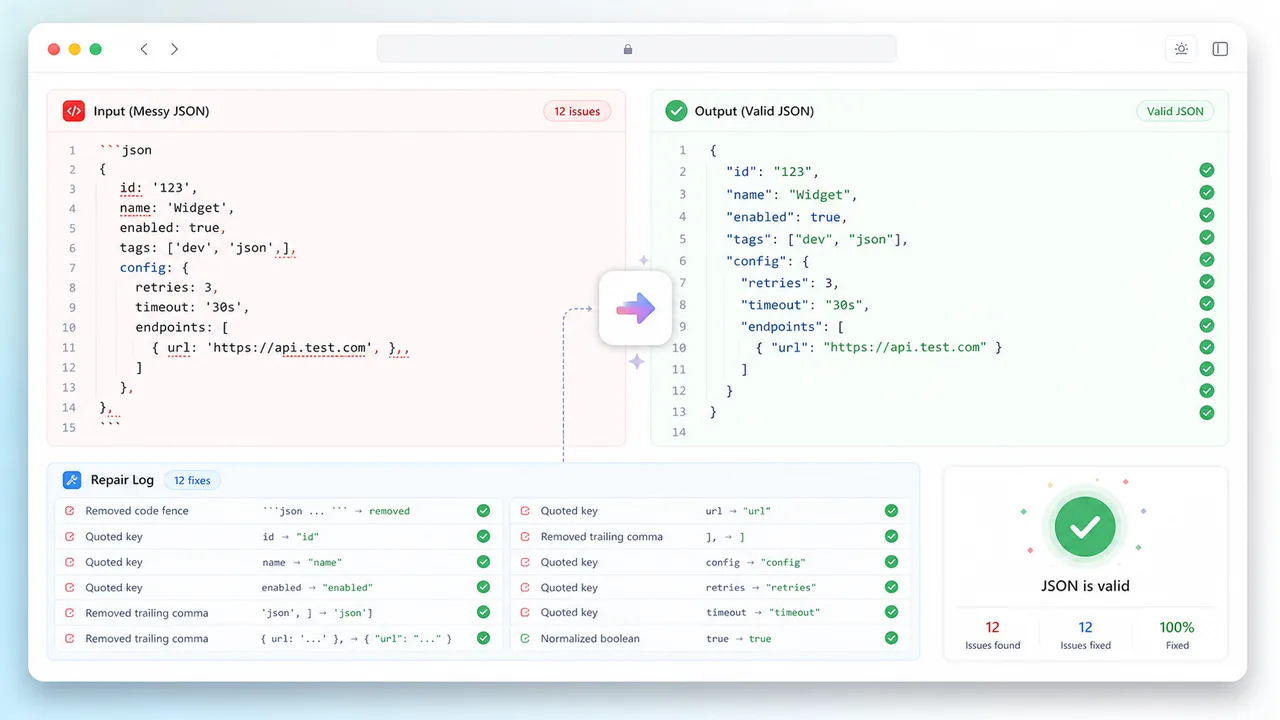
Extract the likely JSON block from assistant prose or markdown fences, then normalize it before use.
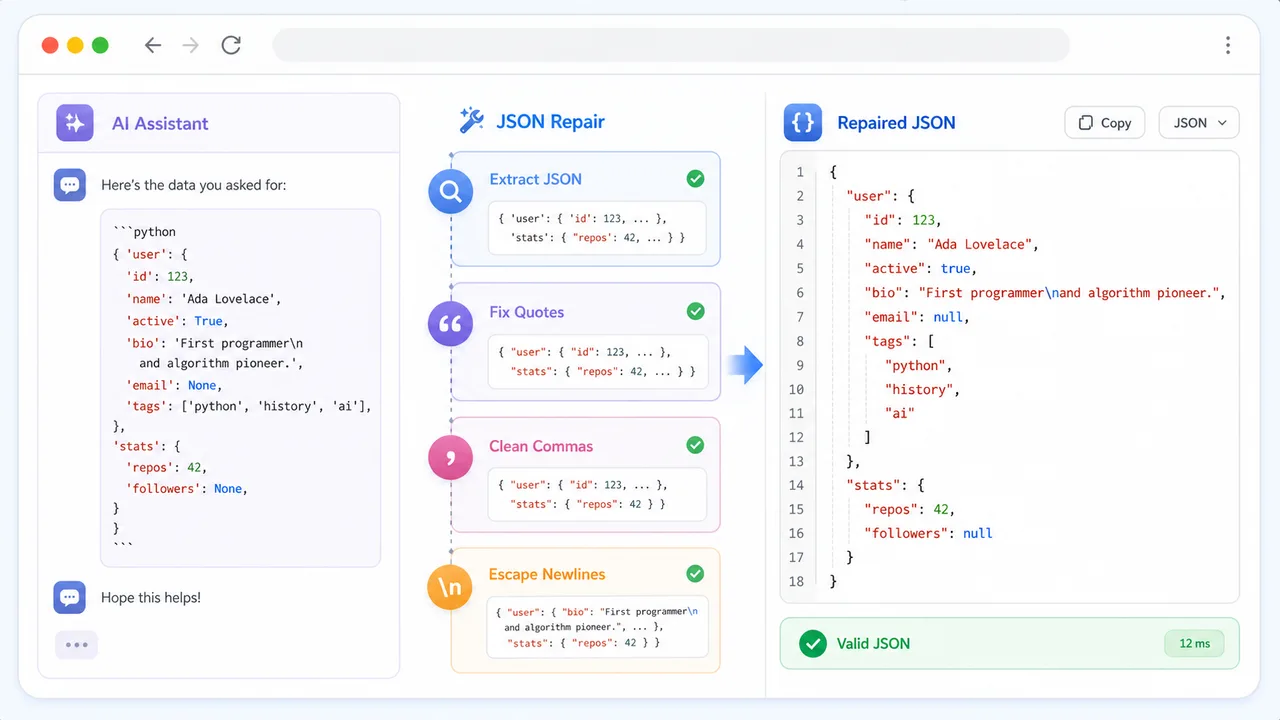
Compare Original JSON, Repaired JSON, and Repair Notes before copying, formatting, or minifying.
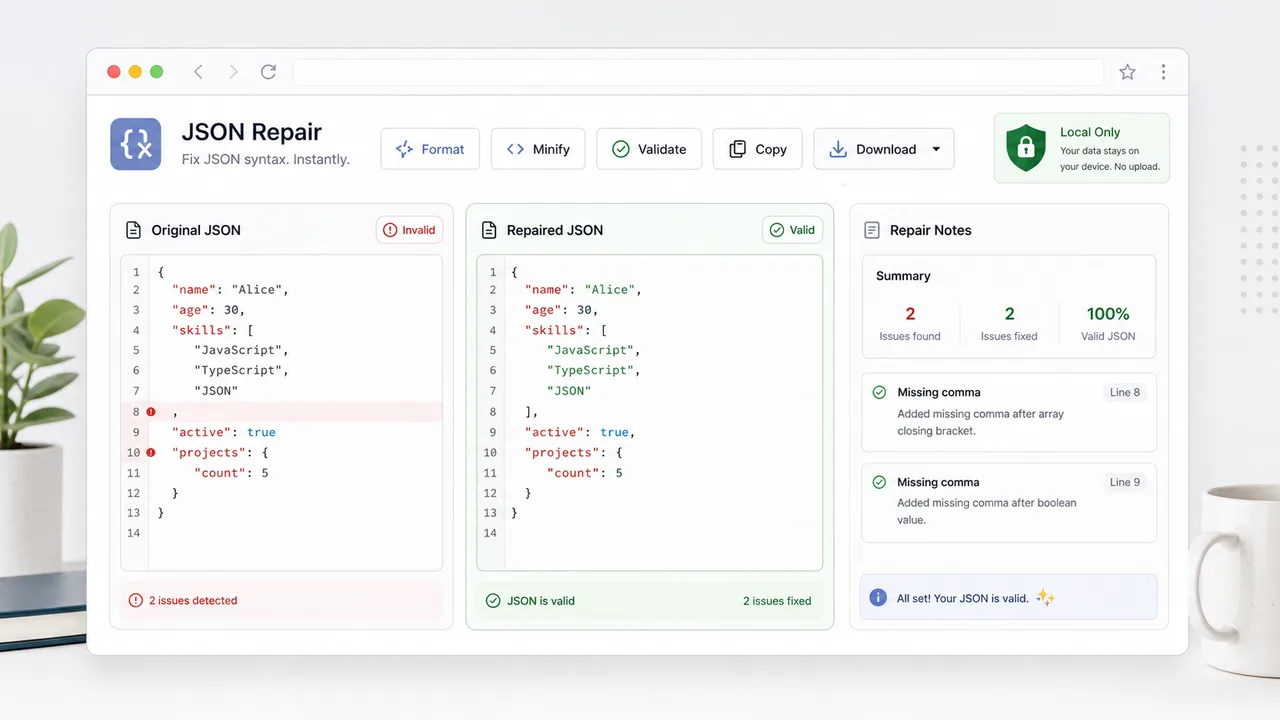
JSON Repair fits quick developer cleanup tasks where manual syntax hunting wastes time.
Convert AI output into valid JSON for schemas, examples, config drafts, and test fixtures.
Repair customer or log payloads before reproducing errors in a console or API client.
Turn pseudo JSON snippets into valid examples before publishing docs or README samples.
Common questions about fixing invalid JSON, pseudo JSON, formatting, minifying, and privacy.
JSON Repair targets common issues such as single quotes, missing quotes around keys, trailing commas, repeated commas, raw newlines in strings, smart quotes, Python-style True/False/None, markdown code fences, and surrounding AI text.
No. Repair, parse, format, minify, validate, and copy actions run in your browser.
No. Deeply ambiguous data still needs human review. The Repair Notes panel shows what changed and reports parser errors when strict JSON cannot be produced.
Yes. Once JSON Repair produces valid JSON, you can switch between formatted and minified output, validate, and copy the result.
Paste invalid JSON, repair common pseudo JSON issues, inspect the notes, then format, minify, validate, and copy the clean result.
Free forever - browser-only JSON repair tool.