Raw logs can expose secrets
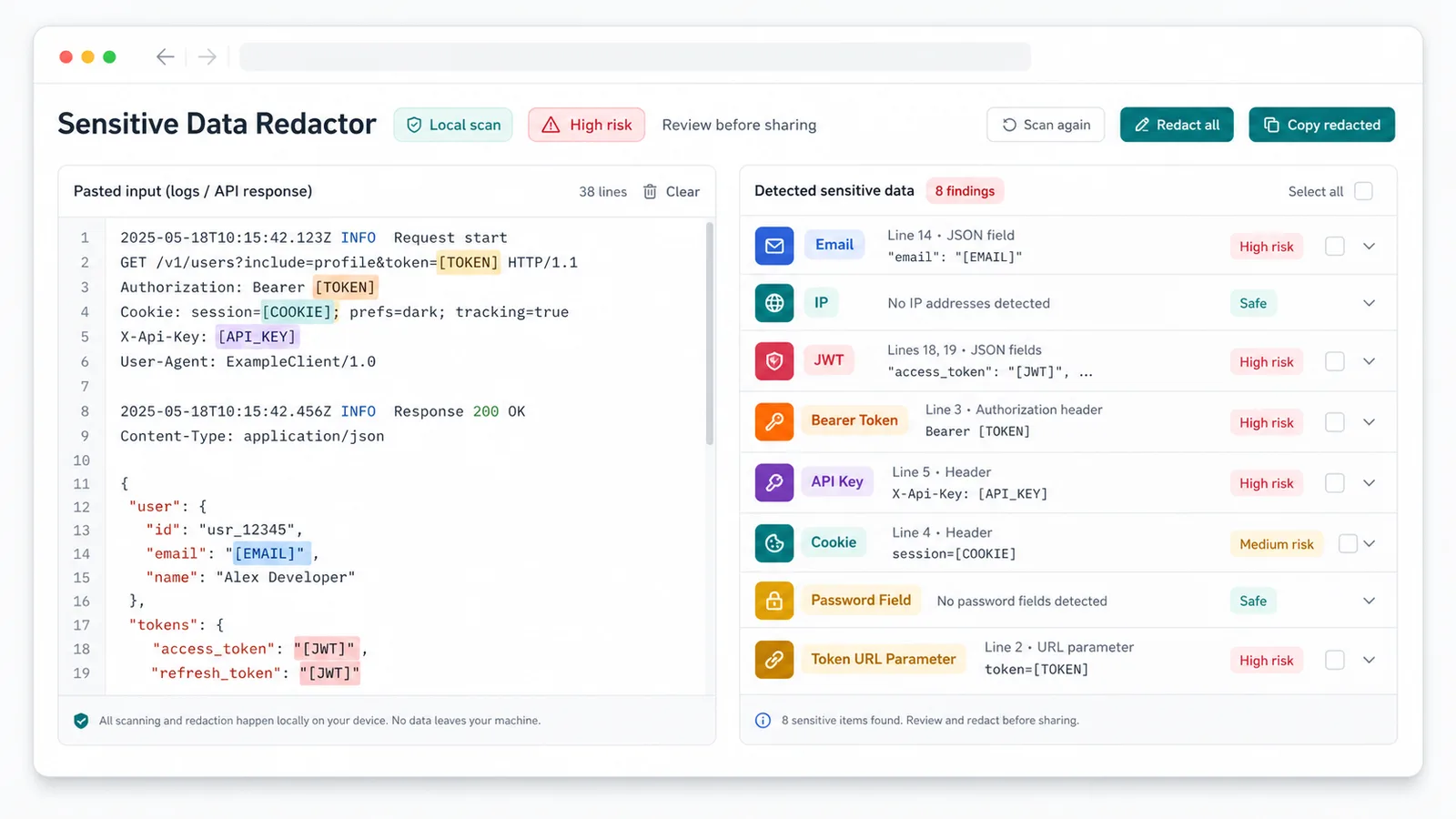
민감 데이터 마스킹 도구 detects JWTs, Bearer tokens, API keys, cookies, authorization headers, passwords, sessions, and token URLs before sharing.
개인정보 도구
민감 데이터 마스킹 도구 detects and masks emails, phones, IPs, URLs, domains, JWTs, Bearer tokens, API keys, passwords, cookies, authorization headers, session IDs, and sensitive URL parameters locally before you share text.
민감 데이터 마스킹 도구 helps you share context without exposing secrets, customer data, or private infrastructure details.
민감 데이터 마스킹 도구 detects JWTs, Bearer tokens, API keys, cookies, authorization headers, passwords, sessions, and token URLs before sharing.
민감 데이터 마스킹 도구 highlights emails, phones, IPs, domains, and suspicious long numbers for manual review.
민감 데이터 마스킹 도구 creates a safer public version from logs, API responses, prompts, config, code, or HTML without uploads.
민감 데이터 마스킹 도구 supports detection-only review, selectable redaction types, masking controls, copy, download, and risk summaries.
Inspect findings in 민감 데이터 마스킹 도구, then redact selected types when ready.
민감 데이터 마스킹 도구 flags JWTs, Bearer tokens, API keys, cookies, passwords, private keys, sessions, and token URL parameters.
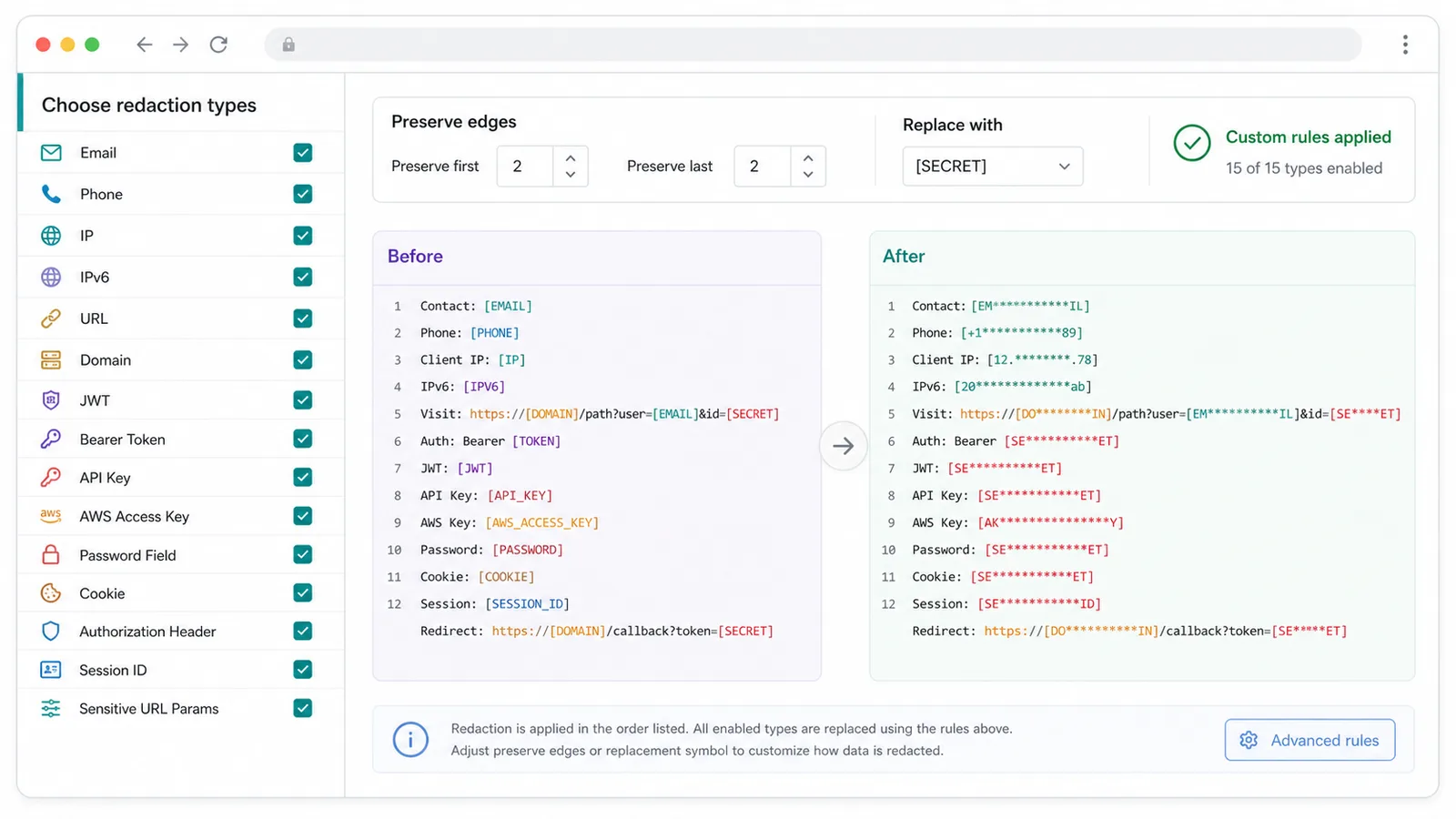
Turn each 민감 데이터 마스킹 도구 type on or off for URLs, domains, phones, and review-only numbers.
Use 민감 데이터 마스킹 도구 to keep first and last characters or replace full values with a custom mask.
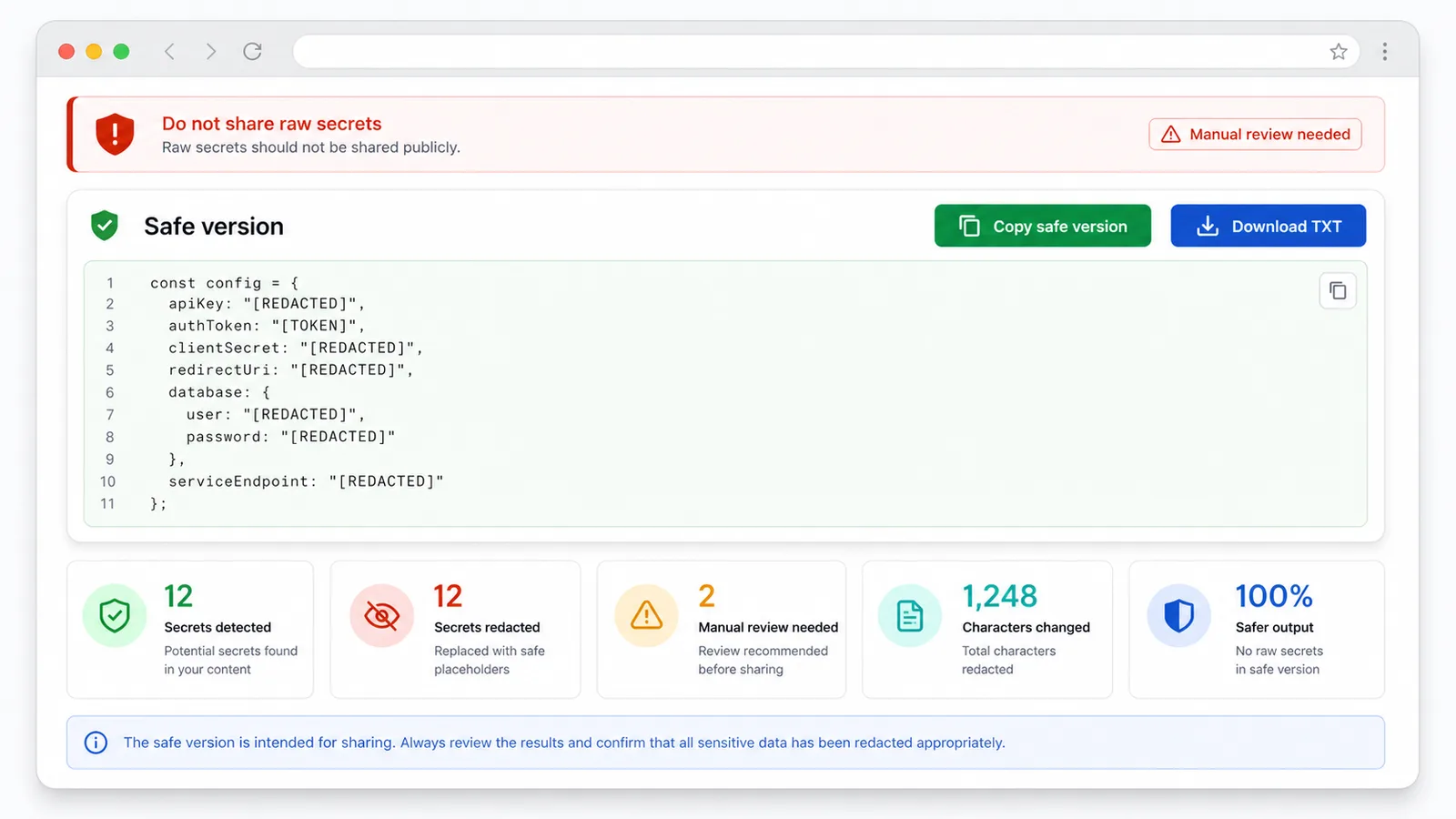
Copy the safe version or download a TXT file after 민감 데이터 마스킹 도구 finishes.
민감 데이터 마스킹 도구 is a front-end rule tool with no upload, database, or backend recognition step.
A quick 민감 데이터 마스킹 도구 workflow before sharing private text.
Paste logs, errors, API responses, chats, emails, prompts, config, code, or HTML into 민감 데이터 마스킹 도구.
민감 데이터 마스킹 도구 열기Check the 민감 데이터 마스킹 도구 summary for high-risk secrets, suspicious fields, and manual-review numbers.
민감 데이터 마스킹 도구 열기Select types, preserve edge characters, set a replacement, or add a custom regex rule in 민감 데이터 마스킹 도구.
민감 데이터 마스킹 도구 열기Copy or download the 민감 데이터 마스킹 도구 output and share only the redacted version.
민감 데이터 마스킹 도구 열기민감 데이터 마스킹 도구 fits the moment before text leaves your private workspace.
민감 데이터 마스킹 도구 detects emails, IPs, URLs, domains, JWTs, Bearer tokens, API keys, cookies, passwords, sessions, and token parameters.
민감 데이터 마스킹 도구 lets you choose types, preserve edges, apply replacements, and add custom regex rules.
민감 데이터 마스킹 도구 shows safe output, a summary, copy, TXT download, and manual-review warnings.
민감 데이터 마스킹 도구 helps before pasting text into AI tools, docs, forums, support tickets, SEO workflows, and issue trackers.
Use 민감 데이터 마스킹 도구 before posting logs, stack traces, cURL examples, config, or API JSON.
Use 민감 데이터 마스킹 도구 to remove customer emails, phones, cookies, sessions, and sensitive IDs before escalation.
Use 민감 데이터 마스킹 도구 before sending prompts, page source, analytics snippets, or crawl errors to AI tools or collaborators.
민감 데이터 마스킹 도구 is related to JWT Decoder, Base64, Text Formatter, and Line Tools, but focuses on privacy masking before sharing.
JWT Decoder inspects token content; 민감 데이터 마스킹 도구 warns that raw JWTs should not be shared and can mask them.
Base64 tools encode or decode, Text Formatter and Line Tools clean text, while 민감 데이터 마스킹 도구 hides sensitive values.
민감 데이터 마스킹 도구 is rule-based, so suspicious numbers or business IDs should be reviewed before publishing.
Common questions about 민감 데이터 마스킹 도구, local processing, supported sensitive data, false positives, and safe sharing.
No. 민감 데이터 마스킹 도구 runs in the browser and does not upload pasted text, findings, or output.
민감 데이터 마스킹 도구 prioritizes emails, phones, IPv4, IPv6, URLs, domains, JWTs, Bearer tokens, API keys, AWS keys, passwords, cookies, authorization headers, sessions, private keys, and sensitive URL parameters.
No. If 민감 데이터 마스킹 도구 finds tokens, keys, cookies, passwords, private keys, sessions, or token URLs, share only the redacted version.
Yes. 민감 데이터 마스킹 도구 is a front-end rule detector, so ambiguous phones, ID numbers, and business IDs need manual review.
Paste private text, review the 민감 데이터 마스킹 도구 summary, redact selected values, and copy a safer version before sharing.