Unreadable Wingdings Symbols
You receive a document full of ✌︎♋︎ symbols and have no idea what they say. A Wingdings translator lets you decode them back to plain text in seconds — no guessing, no manual lookup.
Free Online Wingdings Translator
The fastest free Wingdings translator online. Convert text to Wingdings symbols instantly or decode Wingdings back to readable text. Supports Wingdings V1, V2, and V3.
These are the real situations that send people looking for a Wingdings translator every day.
You receive a document full of ✌︎♋︎ symbols and have no idea what they say. A Wingdings translator lets you decode them back to plain text in seconds — no guessing, no manual lookup.
Wingdings comes in three versions (V1, V2, V3), each with a completely different character set. Our Wingdings translator lets you switch versions instantly so you always get the right result.
Copied Wingdings symbols show as empty boxes on devices without the font. This Wingdings translator renders and converts symbols correctly regardless of what fonts are installed on your system.
Most Wingdings translators only support V1. Ours supports all three versions, works both ways, and runs entirely in your browser.
Full Wingdings translator support for V1, V2, and V3. Switch between all three Wingdings font families with one click to get the exact symbol set you need.
Use this Wingdings translator to encode plain text into Wingdings symbols, or flip the mode to decode mysterious Wingdings symbols back to readable text. Both directions work instantly.
Browse the full Wingdings symbol reference chart for each version. See exactly which keyboard character maps to which Wingdings symbol before you translate.
Copy your Wingdings translator output to the clipboard with a single click. Paste directly into Microsoft Word, Outlook, or any application that supports Wingdings fonts.
The Wingdings translator updates as you type — no submit button, no page reload. Translation happens entirely in your browser with zero latency and zero data sent to any server.
This Wingdings translator is completely free with no account required and no usage limits. All Wingdings conversion happens locally — your text never leaves your device.
Three steps to convert text to Wingdings symbols — or decode Wingdings back to text — using this free online Wingdings translator.
Type or paste the text you want to convert into the Wingdings translator input box. The tool accepts any standard ASCII characters including letters, numbers, and punctuation.
Choose your Wingdings version (V1, V2, or V3) and set the direction — Text to Wingdings for encoding, or Wingdings to Text for decoding. Each Wingdings version has a completely different symbol set.
Wingdings V1 is the most commonly used version and comes pre-installed on most Windows systems. Switch to Wingdings 2 for hand gesture symbols, or Wingdings 3 for directional arrows and geometric shapes.
Your Wingdings translation appears instantly in the output box. Click copy to send the result to your clipboard, then paste it into Microsoft Word, Outlook, PowerPoint, or any other Wingdings-compatible application.
Each version of the Wingdings font contains a completely different symbol set. This Wingdings translator supports all three — choose the right one for accurate results.
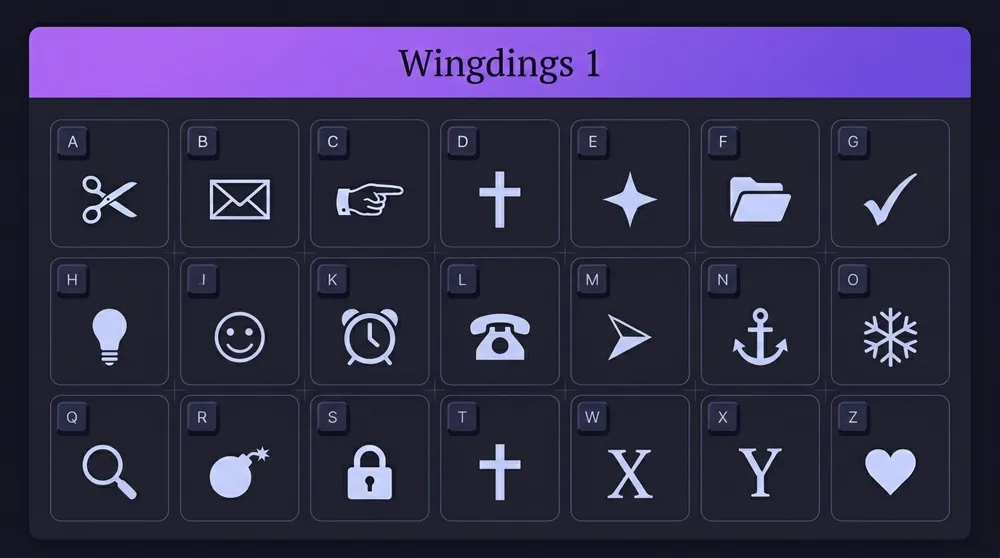
The original Wingdings font, released by Microsoft in 1990. This version of the Wingdings translator covers 224 symbols: pointing hands, crosses, stars, scissors, envelopes, phones, clocks, and ornamental shapes. Wingdings 1 is pre-installed on virtually all Windows computers and is the version most people mean when they say "Wingdings translator".
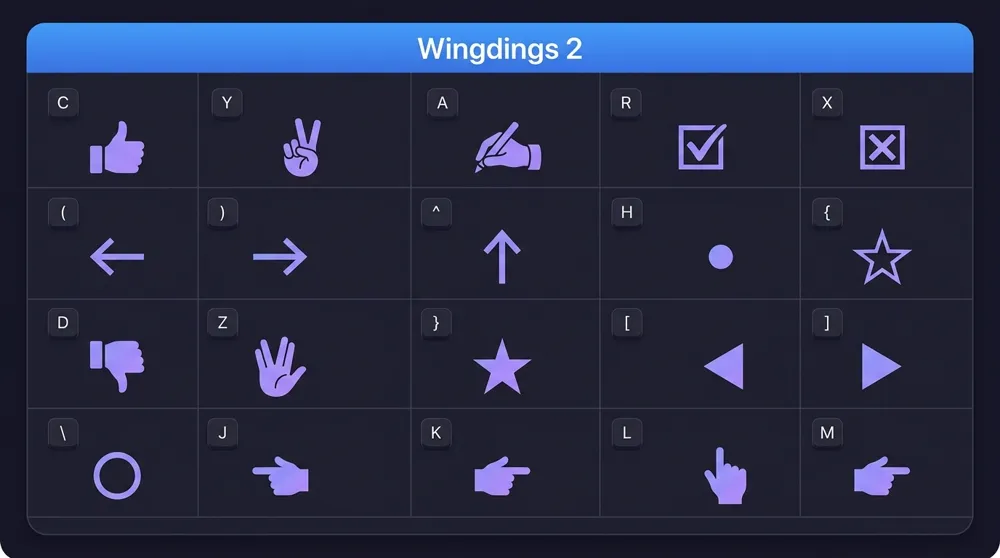
Introduced in the 1990s as an extension of the original Wingdings font. The Wingdings 2 translator focuses on human gestures (thumbs up, peace sign, writing hand), check marks, ballot boxes, and additional decorative symbols. Particularly useful in presentations and Word documents where interaction-style symbols are needed.
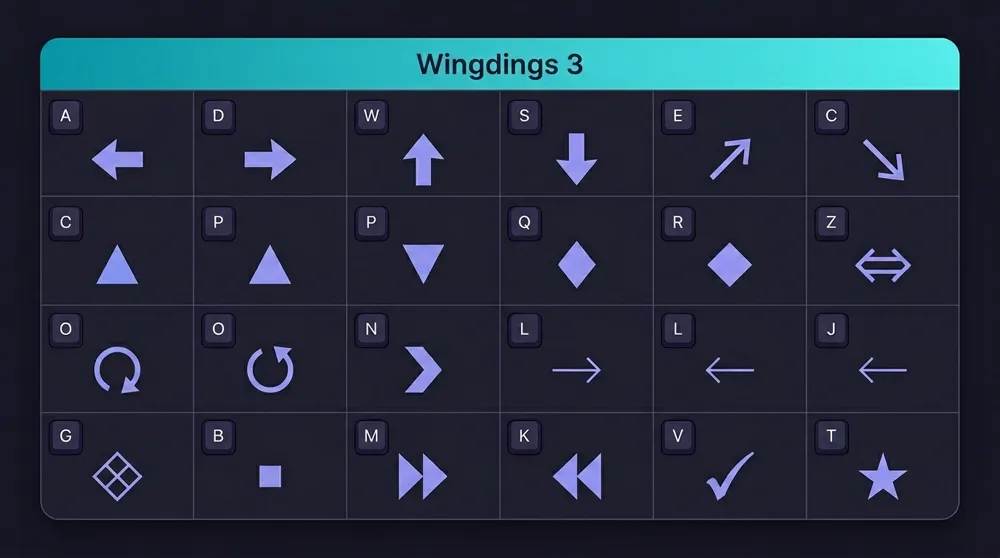
The third version in the Wingdings family. The Wingdings 3 translator specializes in directional arrows pointing in all directions, geometric shapes, and navigation icons. Commonly used in flowcharts, technical diagrams, and documents that require precise directional symbols.
Common questions about using the Wingdings translator, Wingdings symbols, and font compatibility.
A Wingdings translator is an online tool that converts standard text into Wingdings symbols, or decodes Wingdings symbols back into readable text. Our free Wingdings translator supports all three versions — Wingdings 1, Wingdings 2, and Wingdings 3 — and processes everything instantly in your browser.
Wingdings is a dingbat font developed by Microsoft in 1990. It maps standard keyboard characters to graphical symbols including arrows, shapes, check marks, stars, and decorative icons. There are three versions: Wingdings (V1), Wingdings 2, and Wingdings 3, each containing a different symbol set.
This Wingdings translator converts ASCII characters (codes 32–126) to their corresponding symbols in the Unicode Private Use Area (U+F020–U+F0FF), which is where Wingdings characters are encoded. The Wingdings translation happens instantly in your browser as you type — no data is sent to any server.
Yes. Toggle the Wingdings translator mode to 'Wingdings → Text', paste your Wingdings symbols, and the translator will decode them back to readable ASCII text instantly.
Wingdings 1 contains classic symbols like scissors, envelopes, and check marks. Wingdings 2 features human gestures, ballot boxes, and directional symbols. Wingdings 3 specializes in arrows and geometric shapes. You can switch between all three in this Wingdings translator with one click.
Use this Wingdings translator to get your encoded output, copy it, paste it into Microsoft Word, then select the pasted text and change the font to 'Wingdings', 'Wingdings 2', or 'Wingdings 3' from the font dropdown. Word will render the symbols correctly once the right Wingdings font is applied.
Boxes (□) appear when the Wingdings font is not installed on the recipient's device. Wingdings uses the Unicode Private Use Area, so systems without the font show empty placeholders. To share Wingdings content reliably across platforms, export the result as an image rather than raw Wingdings text.
Both are Microsoft symbol fonts, but Webdings was designed for HTML web pages while Wingdings was designed for desktop documents. They have entirely different character mappings and are not interchangeable. Most people searching for a 'Wingdings translator' are looking for the desktop Wingdings font, not Webdings.
Yes, this Wingdings translator is 100% free with no usage limits, no account required, and no hidden costs. All Wingdings translation happens locally in your browser — your text never leaves your device.
Wingdings is just the beginning.
We're building more symbol translators including Fancy Text, Bubble Text, and more.
100% Free · No Signup Required · All Processing in Browser