Platform limits are easy to miss
Compare X/Twitter, Instagram, TikTok, LinkedIn, YouTube, and Facebook character limits without opening six separate help pages.
Free Social Media Tool
Paste a caption or post to see remaining characters for X/Twitter, Instagram, TikTok, LinkedIn, YouTube, and Facebook before you publish.
Keep publishing checks in one place for creators, operators, and social editors.
Compare X/Twitter, Instagram, TikTok, LinkedIn, YouTube, and Facebook character limits without opening six separate help pages.
Review first lines, line breaks, hashtags, and emoji so the first screen of a post stays readable.
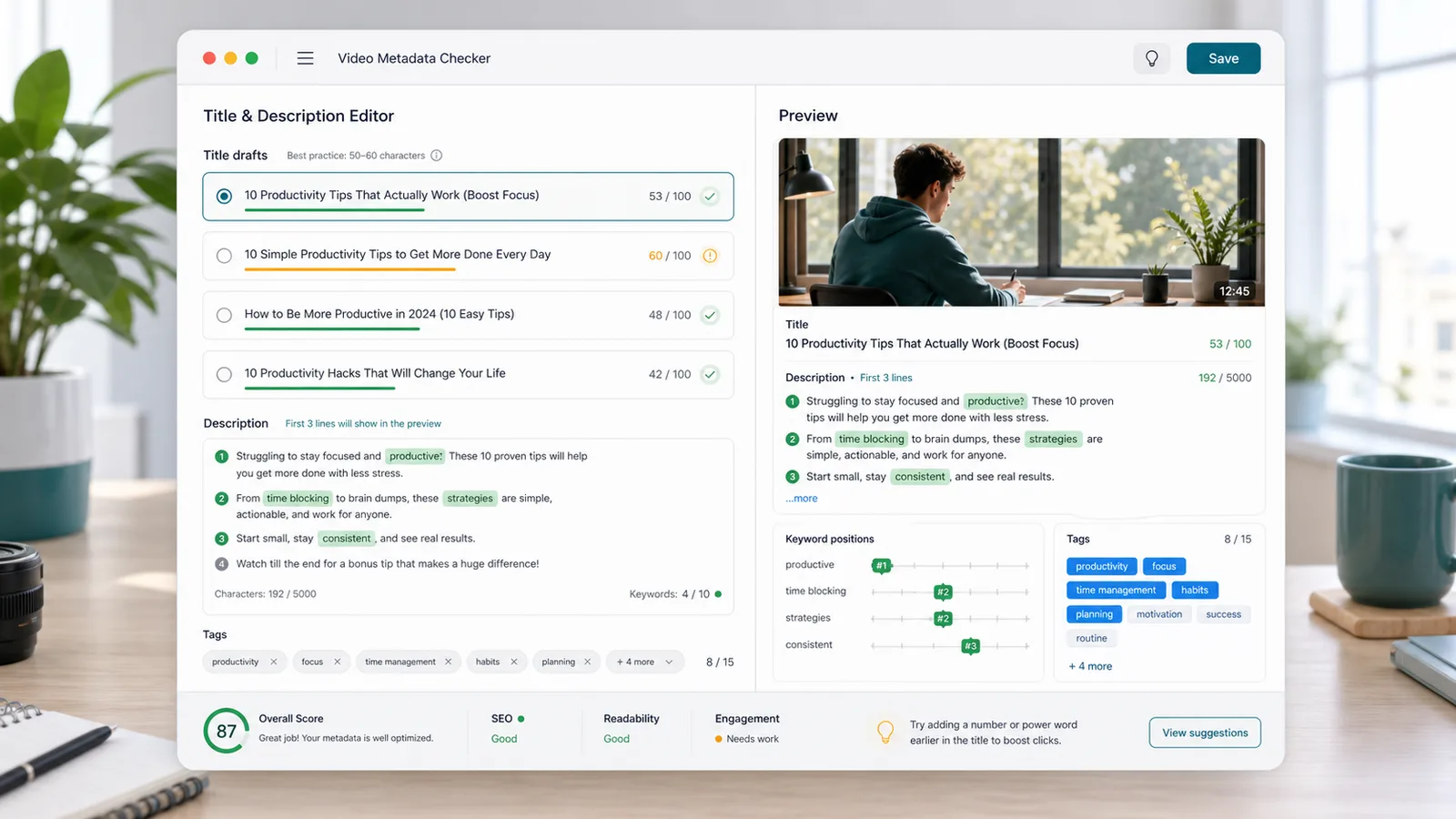
Compare title drafts, inspect keyword positions, preview first description lines, and check tag count before upload.
Use it for caption length, creator SEO, publishing QA, and cross-platform editing.
See remaining or over-limit characters for X/Twitter, Instagram, TikTok, LinkedIn, YouTube title, YouTube description, and Facebook.
Count total characters, words, hashtags, emoji, and line breaks for quick social media copy editing.
Paste multiple title ideas and compare each against the 100-character title limit.
Add target keywords and see whether they appear early in the YouTube description.
Inspect the first three lines so the hook, summary, and keyword placement stay visible before links.
Count YouTube tags, check tag characters, and keep the list focused before publishing.
A fast workflow for social posts, short videos, LinkedIn updates, and YouTube metadata.
Add a caption, post, short video description, or LinkedIn update and review platform remaining counts instantly.
Open the counterCheck characters, words, hashtags, emoji, line breaks, close-to-limit warnings, and over-limit states.
Check limitsCompare title drafts, inspect the first description lines, confirm keyword positions, and check tags before upload.
Review metadataSupport everyday publishing workflows from one browser-based workspace.
Paste one post and see whether it fits X/Twitter, Instagram, TikTok, LinkedIn, YouTube, and Facebook.

Use title preview, draft comparison, keyword positions, description checks, and tag checks for video uploads.
Catch over-limit copy, crowded hashtags, too many emoji, and long first lines before scheduling.

Built for operators, creators, social editors, and YouTube creators.
Check captions across multiple networks before a scheduled campaign goes live.
Keep hooks concise and confirm hashtags, emoji, and line breaks before posting.
Compare titles, inspect description openings, and keep tags within a practical range.
Use one checklist with related tools like /tools/ for SEO and publishing QA.
Use practical public limits and local counting for pre-publish checks.
The checker includes common limits for X/Twitter posts, Instagram captions, TikTok captions, LinkedIn posts, YouTube titles and descriptions, and Facebook posts.
The tool counts visible grapheme characters locally. Some platforms may weight URLs, mentions, or special characters differently after publishing.
YouTube title, description, keyword position, first-line, and tag checks help creators review metadata before upload.
Common questions about platform limits, social copy checks, and YouTube metadata.
No. It runs in your browser and does not upload the pasted post, description, title drafts, keywords, or tags.
It checks X/Twitter, Instagram, TikTok, LinkedIn, YouTube title, YouTube description, and Facebook limits.
Yes. Paste one title draft per line and the tool compares each draft against the YouTube title limit.
They are practical pre-publish checks. Some platforms may count URLs, emoji, mentions, or special characters differently, and limits can change.
Paste your next caption, fix over-limit copy, and publish with fewer surprises.